A business account on Instagram can auto reply inside the inbox for free, with a welcome message and FAQs. Auto replies to comments, Story replies and keyword DMs need a tool on Meta's official API, such as BlipDM.
People who message a business usually want an answer now: the price, the link, the timings, whether something is in stock. Instagram auto reply gets it to them in seconds. An automatic message goes out the moment someone sends a DM, comments on a post or replies to your Story, so they get an answer while they are still interested. This article covers what Instagram gives you for free, what needs a tool, how to set up each type, the rules Meta sets, and messages you can copy.
Key takeaways
Instagram's app can auto reply only inside your inbox, with a welcome message and frequently asked questions on professional accounts. It cannot reply to comments or send link buttons.
For comments, Story replies and keyword DMs you need a tool on Meta's official API. BlipDM does all three on its free plan, with 500 DMs a month. Pro is $3 a month and Elite is $6 a month.
Auto replies are only allowed after the person acts first. You can send one private reply per comment, within 7 days, and you can message freely for 24 hours after someone messages you.
The four kinds of Instagram auto reply
"Auto reply" can mean four different things, and each is set up differently.
| Type | What starts it | What goes out | Built into Instagram? |
|---|---|---|---|
| DM auto reply | Someone sends you a message | A reply in the chat | Partly: welcome message and FAQs only |
| Comment auto reply | Someone comments on a post or reel | A DM, a public reply under the comment, or both | No |
| Story auto reply | Someone replies to your Story | A reply in the chat | No |
| Tap-to-ask questions | Someone taps a suggested question in a new chat | The answer you wrote | Yes, in Instagram's own FAQ tool |
Most accounts get the biggest return from comment auto reply, because that is where public demand shows up. When a reel takes off, nobody can answer 300 comments saying "link" by hand.
What Instagram's own auto reply can do
Business and Creator accounts get a few free messaging tools inside the app, under Messaging tools in your account settings:
- Welcome message: a greeting shown to people who start a new chat with you.
- Frequently asked questions: tappable questions at the start of a chat, each with a fixed answer.
- Saved replies: shortcuts that paste a message you wrote. Someone still has to send it, so this speeds up typing but isn't automatic.
For a small account with a few predictable questions, that may be enough. The limits show up quickly, though:
- Nothing responds to comments on your posts or reels.
- Nothing responds to Story replies by keyword.
- Answers can't carry link buttons or carousels.
- Nothing recognises a word in a message, so "price?" gets no special answer.
We cover each of these tools in Instagram's built-in messaging tools. If you only need to type faster, see Instagram quick replies.
How to set up Instagram auto reply for DMs
A DM autoresponder answers people who message you directly. In BlipDM you can reply to a specific keyword, to every message, or both.
- Sign up and connect your Instagram professional account through Instagram's own login screen.
- Create a DM Autoresponder.
- Choose Keyword to answer a word such as PRICE, or Any message to answer everything.
- Write your reply. Add up to three link buttons, or send an image.
- Leave only once per person switched on if the reply is a greeting, so regular contacts aren't greeted every time they write.
- Send the keyword from a second account to test it.
You can run both together. In BlipDM a keyword always beats the catch-all, so "price?" gets your pricing message and everything else gets your general reply. Matching ignores capitals and finds the word inside a longer message, so "what's the PRICE of this" still works.
How to set up comment auto reply
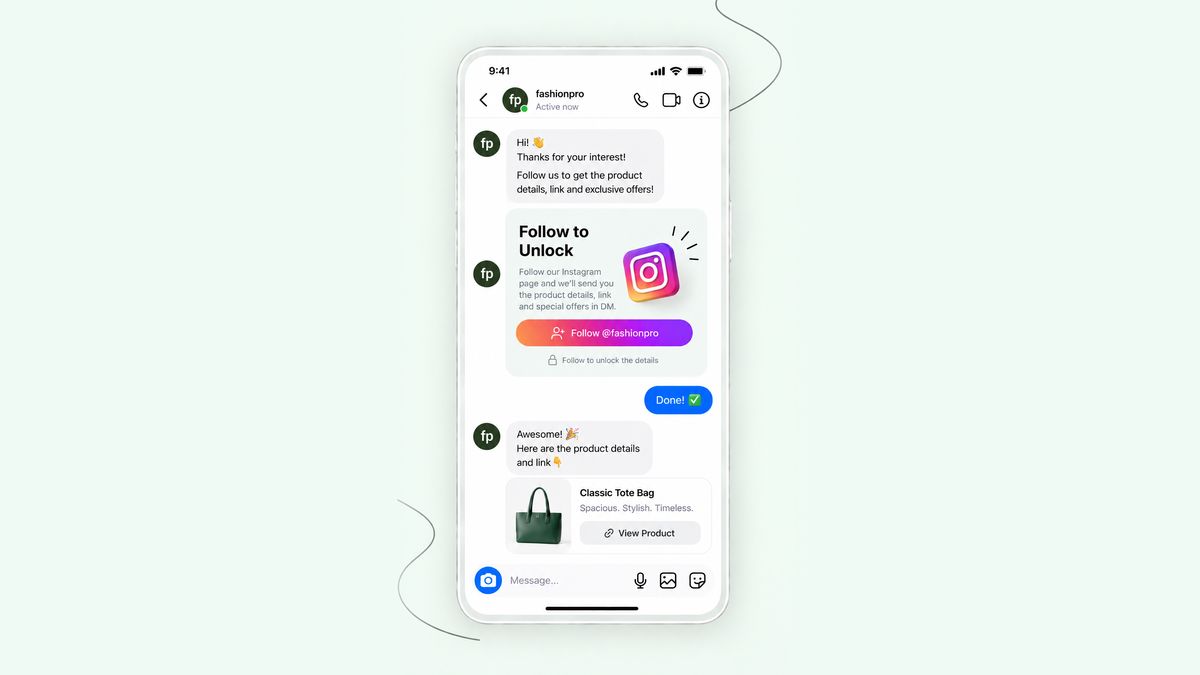
This is the classic "Comment LINK and I'll DM it to you" setup.
- Create a Comment to DM automation and pick the post or reel.
- Choose a keyword, or reply to any comment.
- Write the DM with your link button.
- Add a public reply such as "Sent! Check your DMs." You can add up to five variations so the replies don't all look the same.
- Put the keyword in your caption, and say it in the video if you can.
Our comment-to-DM setup walkthrough has more detail, and there's help choosing a comment keyword. On Pro and Elite you can also attach an automation to your next post before you publish it.
How to set up Story auto reply
Every Story reply lands in your DMs, which makes Stories a good way to offer something small. Post "Reply PLAN and I'll send this week's plan", create a Story Reply Automation, pick the Story and set the keyword. See the Story reply feature for ideas.
The rules Meta sets for auto replies
Auto reply is allowed, but within limits. These apply to every tool, because they come from Meta.
| Rule | What it means |
|---|---|
| The person acts first | You can't message someone who hasn't interacted with you |
| One private reply per comment | One DM per comment, sent within 7 days of the comment |
| 24-hour window | You can message for 24 hours after someone messages or taps a button |
| 750 private replies an hour | The cap per account for replies to post and reel comments |
| Official API only | Tools that ask for your password work outside these rules and put your account at risk |
One detail catches people out. A private reply to a comment doesn't open the 24-hour window. Further messages are only allowed once the person replies or taps something. Read more in how to use Instagram auto DM without getting banned.
12 Instagram auto reply messages to copy
Swap in your own details. Keep links in buttons rather than in the text where you can.
Greeting for any new DM
- Hi! Thanks for messaging us. We reply to everything personally within a few hours. For quick answers, send PRICE, TIMINGS or LOCATION.
- Hey, thanks for reaching out! I read every message, usually in the evenings. If you're after my free guide, send GUIDE.
Away from your desk
- We're closed right now and back at 9am. Leave your question here and we'll reply first thing. Our full menu is on the button below.
- I'm on a shoot today, so replies may be slow. Everything I use is linked below.
Price and product questions
- Our packages start at [price]. See them all on the button below, or tell us what you need and we'll suggest one.
- Here's the link to the [product]. We ship across [region] in [time]. Reply if you need help with sizing.
Comments
- Public reply: Sent! Check your DMs 💌
- DM: Here's the link you asked for. Thanks for commenting!
- DM: Here's your free guide. Tell me what you think once you've read it.
Bookings and enquiries
- Book your free call using the button below. Pick any time that suits you.
- For collaborations, please send your brand, what you have in mind and your timeline. I'll get back to you within the week.
Stories
- Thanks for replying! Here's this week's offer. It's valid until Sunday.
Mistakes to avoid
- Pretending to be a person. A clear, friendly automated reply is fine. A message that implies you've read their words when you haven't feels off when they notice.
- Replying to every comment with the same line. Use variations, and don't reply publicly to comments that are complaints.
- Leaving no route to a human. Say how to reach you. Your auto reply starts the chat, and you can still answer personally in Instagram at any time.
- Too many keywords at once. Three or four clear ones are easier for people to remember than a long list.
- Never testing. Always test from a second account. Your own comments and DMs may not behave like a customer's.
Which setup should you start with?
- Few messages, simple questions: Instagram's free welcome message and FAQs.
- People ask for links in comments: comment auto reply, free on BlipDM.
- Busy inbox with repeat questions: keyword DM replies plus an any-message greeting.
- Collecting leads: email and phone capture in the DM on Elite. See Instagram lead generation.
BlipDM runs on Instagram's official API as a Meta Tech Provider. The Free plan covers comment, Story and DM auto replies with 500 DMs a month and no branding, and Elite at $6 a month (₹499 in India) has no DM limit. See pricing.
Frequently asked questions
Does Instagram have an auto reply feature?
Partly. Business and Creator accounts can set a welcome message and frequently asked questions with automatic answers in the inbox. Instagram has no built-in way to auto reply to comments or send a keyword-based reply. That needs a tool on Meta's official API.
How do I turn on auto reply on Instagram?
For the built-in options, open your account settings on a professional account and go to Messaging tools. For keyword replies, comments and Stories, connect your account to a tool such as BlipDM, create an automation, choose the trigger and write your reply.
Can I auto reply to Instagram comments?
Yes, with an automation tool. BlipDM can post a public reply under the comment and send a private DM. Meta allows one private reply per comment, sent within 7 days of the comment.
Is Instagram auto reply free?
Instagram's built-in tools are free. BlipDM's Free plan also includes comment, Story and DM auto replies with 500 DMs a month. Pro is $3 a month for 50,000 DMs and Elite is $6 a month for unlimited DMs.
Is auto reply safe for my Instagram account?
Yes, when it uses Meta's official API and you connect on Instagram's own login screen. Avoid any tool that asks for your password or promises to message people who never contacted you.
Do I need a professional account for auto reply?
Yes. Instagram's messaging tools and the official API both need a Business or Creator account. Switching from a personal account is free in Instagram's settings.
Can I reply manually after an auto reply goes out?
Yes. The conversation stays in your normal Instagram inbox, and you can answer it there whenever you like.
Does auto reply work when I'm asleep or offline?
Yes. Replies are sent by the automation, so they go out at any hour without your phone being on.