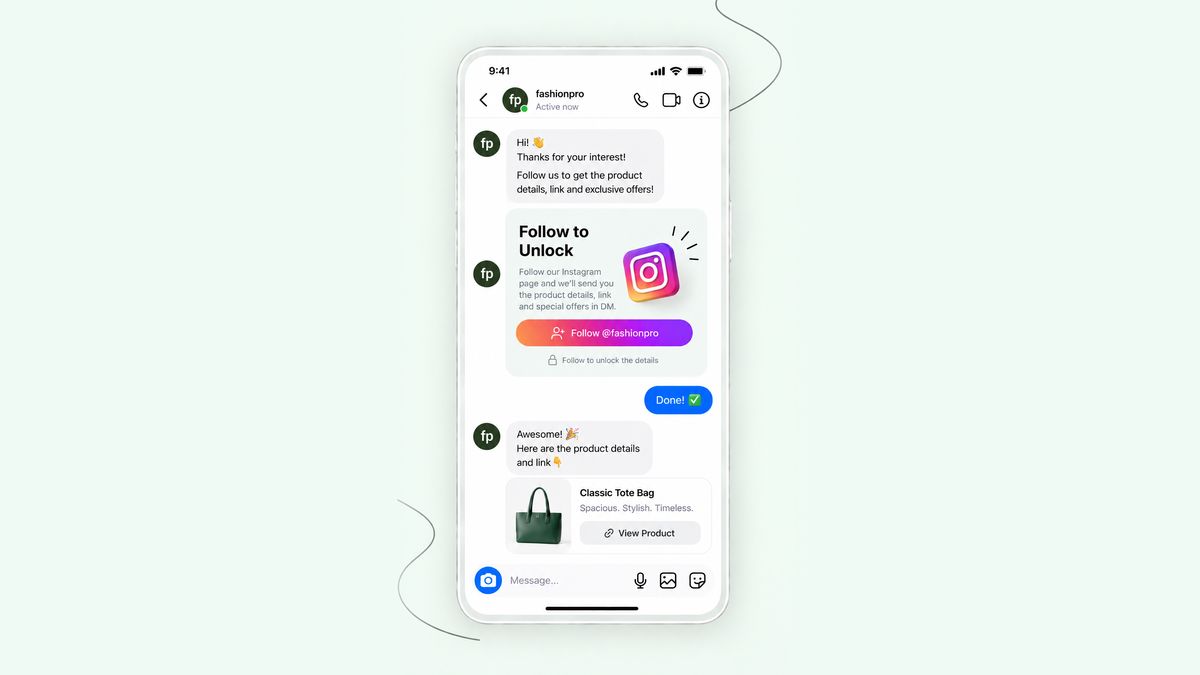
You can sell on Instagram in three main ways: with an Instagram shop that sends buyers to your website, by tagging products in posts and Reels, and by selling in DMs, where someone asks about a product and you send them a link to buy. Most small sellers use all three, and most of their sales start with a conversation.
One big thing changed recently. As of September 2025, Meta says shops on Facebook and Instagram use website checkout: buyers browse in Instagram, but they pay on your website. If you read older guides about "Instagram Checkout", that's why they no longer match what you see.
This guide explains each way to sell, how to set up a shop, what Meta requires, and how to turn comments and DMs into orders, with message templates you can copy.
Key takeaways
Instagram is now a place to be discovered, not a place to pay. Buyers find you on Instagram and finish the purchase on your own site, a marketplace listing or a payment link.
To open a shop, your account must be a professional account, meet Meta's commerce eligibility requirements and be in a supported country. You need a website where people can buy.
Most sales on Instagram start in the comments and DMs: "price?", "link?", "do you have it in M?". Answering within seconds, with a link that goes straight to the product, is the biggest thing you can do to sell more.
The five ways to sell on Instagram
| Method | What it is | Needs a website? | Best for |
|---|---|---|---|
| Instagram shop | A storefront tab on your profile with products from your catalog | Yes, for checkout | Brands with a catalog |
| Product tags | Tags on posts, Reels and Stories that open a product page | Yes (via your shop) | Showing products in use |
| Link in bio and Story links | A link on your profile, or a link sticker in Stories | Yes, or a payment link | Every seller |
| DMs and comments | People ask, you reply with a link, a price or a payment link | No | Small sellers, made-to-order, India |
| Ads and partnerships | Paid ads, creator collabs, affiliate links | Usually | Scaling up |
You don't need all five on day one. A professional account, good posts and fast replies in DMs are enough to make your first sales.
What changed with Instagram checkout
Meta's Business Help Centre states that, as of September 2025, shops on Facebook and Instagram use website checkout. Shops that used to take payment inside Instagram were either moved to website checkout or became invisible.
What stays the same:
- Your shop still has a home page, collections and product pages inside Instagram.
- You can still tag products in posts and Reels.
- People still discover and browse your products in the app.
What's different:
- Buyers pay on your website. You need a checkout URL for your products.
- Order management moved to your own store. Commerce Manager no longer handles the post-purchase side of orders.
- Ads reporting changed. Purchase metrics that used to happen on Meta no longer apply.
For a small seller, this is mostly good news. You keep the customer, the email address and the payment, and you're not tied to Meta's rules for shipping and returns on checkout orders. The cost is one extra step for the buyer, which is why answering questions fast in DMs matters even more.
How to set up an Instagram shop
1. Check you're eligible
Meta's commerce eligibility requirements say your Instagram professional account must:
- Comply with Meta's policies, including its commerce policies.
- Represent your business and your domain.
- Be located in a supported country.
- Demonstrate trustworthiness.
- Provide accurate information and follow best practices.
Shops are for physical products. Services, digital downloads and many restricted categories (such as medicines, weapons and adult products) can't be sold through a shop. Eligibility also varies by country, so check Meta's list of supported countries before you start.
2. Switch to a professional account
In the app, go to Settings, then Account type and tools, and switch to a Business or Creator account. Most shops use Business.
3. Connect a Facebook Page and Commerce Manager
Shops are managed in Meta's Commerce Manager. You'll need a Facebook Page for your business, connected to your Instagram account. In Commerce Manager, create a commerce account and choose Instagram as a sales channel.
4. Add your product catalog
Add products by hand, upload a spreadsheet, or connect a platform such as Shopify, WooCommerce or BigCommerce, which keeps prices and stock in sync. Each product needs a photo, a title, a price and a link to the product page on your website. You can only connect one catalog to your shop, and you can't swap it for a different one later, so pick carefully.
5. Submit for review
Meta reviews your account and domain. It usually takes a few days. Once you're approved, the shop appears on your profile and you can start tagging products.
6. Tag products in your posts and Reels
When you share a post, tap "Tag products" and pick items from your catalog. Tagged posts show a shopping bag icon, and a tap opens the product page. You can also add product stickers to Stories.
How to sell on Instagram without a shop
Many small sellers, especially in India, never set up a shop. They sell through posts, Stories and DMs, and take payment by UPI, payment link or a simple online store. This works well for made-to-order products, small batches, home bakers, boutique fashion and anything that sells best after a short chat.
The usual flow:
- Post the product with a clear photo, price and "comment for details".
- Someone comments or DMs: "price?", "available in L?", "how to order?".
- You reply with details and a link: a product page, a payment link or a WhatsApp chat.
- They pay and you confirm the order.
The weak point is step 3. If you reply two hours later, many buyers have moved on. If you reply in seconds, you catch them while they're still looking at the post. That's where comment-to-DM automation helps.
Turn comments into orders
Comments like "price?" and "link?" are the clearest buying signal on Instagram. With comment-to-DM automation, people who comment a keyword get a DM straight away, with the product and a button to buy.
Set it up in five minutes
- Connect your Instagram account to BlipDM through Instagram's own login screen. BlipDM never sees your password.
- Pick the post or Reel.
- Choose the keyword, such as PRICE, LINK or the product name. BlipDM matches it as a whole word, ignoring capitals and emoji.
- Write the DM: up to 400 characters of text and up to three link buttons, or a carousel of up to five products (Pro and Elite).
- Turn on a public reply under the comment ("Sent you the details 💌"), then test from a second account.
The full walkthrough is in set up your first comment-to-DM automation.
Message templates for selling on Instagram
Price and link:
"Hi! The [product] is ₹1,299 and ships in 2 days 📦 Tap below to order. [Buy now]"
Sizes and stock:
"Thanks for asking! This one's available in S, M and L. Tap to pick your size, and reply here if you're not sure which fits. [Choose size]"
Made-to-order:
"Hi! Each one is made to order and takes 5 days. Tap below to place your order, or reply with any questions. [Order now] [See more designs]"
Range of products: send a carousel of up to five products, each with its own photo, price and "Buy" button.
Discount code:
"Here's your code: FIRST10 for 10% off your first order. Valid till Sunday. [Shop now]"
For more on clickable links, see how to send links in Instagram DMs.
Ten habits of people who sell well on Instagram
- Show the product in use. A Reel of someone wearing the dress sells better than a flat photo.
- Put the price in the caption or answer it instantly. "DM for price" puts people off when nobody replies.
- Reply within minutes. Comments and DMs are buying signals with a short shelf life.
- Use one clear call to action per post. "Comment LINK" or "Tap the tag", not both plus "link in bio".
- Post Stories daily. Stories with a link sticker or "Reply YES" keep you in front of people who already follow you.
- Share customer reviews and photos. Ask permission and tag the customer.
- Collect emails. Instagram only lets you message someone within 24 hours of their last message, so build a list you can reach. On BlipDM's Elite plan, the DM can ask for an email address, check it and save it. See lead capture.
- Plan around the calendar. Black Friday, Small Business Saturday, Christmas and New Year in the West; Diwali, wedding season and Republic Day sales in India. See the holiday sales ideas guide and the Small Business Saturday playbook.
- Run a giveaway now and then to reach new people. Follow Instagram's rules, which are in our giveaway guide.
- Use your link in bio wisely. Point it at your bestsellers or this week's offer, not just your home page. Compare it with DMs in link in bio vs comment-to-DM.
Selling on Instagram in India
A few things are different for Indian sellers:
- Payments. UPI is how most buyers expect to pay. A payment link, a store on a platform such as Shopify or Dukaan, or a UPI ID in the DM all work. Avoid asking strangers to send money before you've confirmed the order details in writing.
- Cash on delivery. Many buyers still prefer COD for first orders from a new brand. If you offer it, say so in the DM.
- WhatsApp. Many sellers move the order to WhatsApp after the first DM. A button in your DM that opens a WhatsApp chat keeps it to one tap.
- The sales calendar. Diwali, wedding season (November and December), Black Friday, which became India's top D2C order day in 2025, and the Republic Day sales in January.
BlipDM's paid plans are priced in rupees: Pro is ₹99 a month and Elite ₹499, and you can pay with UPI AutoPay. The Free plan covers 500 DMs a month.
Rules to know before you sell
- Commerce policies. Meta's commerce policies list what you can't sell, including weapons, drugs, animals, adult products and some health products. Breaking them can cost you your shop or your account.
- Honest descriptions. Say what the product is, what it costs and how long delivery takes. Hidden charges lead to reports and bad reviews.
- Branded content and affiliates. If you're paid to promote a product, or you earn commission, you must disclose it. Read how to share affiliate links in Instagram DMs.
- Messaging limits. Meta lets you send one private reply to each comment within 7 days, up to 750 per hour, and keep talking for 24 hours after someone replies. Tools on Meta's official API stay within those limits. See is Instagram DM automation safe.
If you sell physical products online, the E-commerce brands page shows how product links, carousels, codes and waitlists fit together.
Frequently asked questions
Can you sell directly on Instagram?
You can list products, tag them and let people browse inside Instagram, but as of September 2025 Meta says shops use website checkout, so buyers pay on your website. Many small sellers also sell through DMs and take payment with a payment link or UPI.
How do I start selling on Instagram?
Switch to a professional account, post clear photos and Reels of your products with prices, and reply to every comment and DM fast with a link to buy. When you have a website and a product catalog, set up an Instagram shop through Commerce Manager and start tagging products.
Do I need a website to sell on Instagram?
You need one for an Instagram shop, because checkout happens on your website. You don't need one to sell through DMs: you can send a payment link, a UPI ID or a link to a marketplace listing.
Is Instagram Checkout still available?
Not for shops. Meta's Business Help Centre says that as of September 2025, shops on Facebook and Instagram use website checkout, and shops that used checkout on Instagram were moved to website checkout or became invisible.
How do I sell on Instagram without a shop?
Post products with prices and a clear call to action such as "Comment PRICE for the link". Reply to each comment with a DM that has the product link or a payment link. Comment-to-DM automation sends those replies within seconds, even when you're busy.
What sells best on Instagram?
Products that look good in photos and video and that people buy on impulse or as gifts: fashion, jewellery, beauty, home décor, food and handmade goods. Digital products and services sell well too, through DMs and link in bio rather than through a shop.
How do I get my first sale on Instagram?
Tell the people who already know you, post the product in use, give one clear way to buy, and answer every question within minutes. A small launch offer for your first customers, sent by DM to people who comment, helps too.
Sources
- Meta Business Help Centre, About changes to Shops and checkout on Facebook and Instagram, checked 9 November 2026.
- Meta Business Help Centre, About Commerce Manager.
- Instagram Help Centre, Commerce eligibility requirements, checked 9 November 2026.
- Meta for Developers, Instagram private replies and messaging documentation.
- GoKwik via Entrepreneur India, Black Friday D2C order data for 2025.