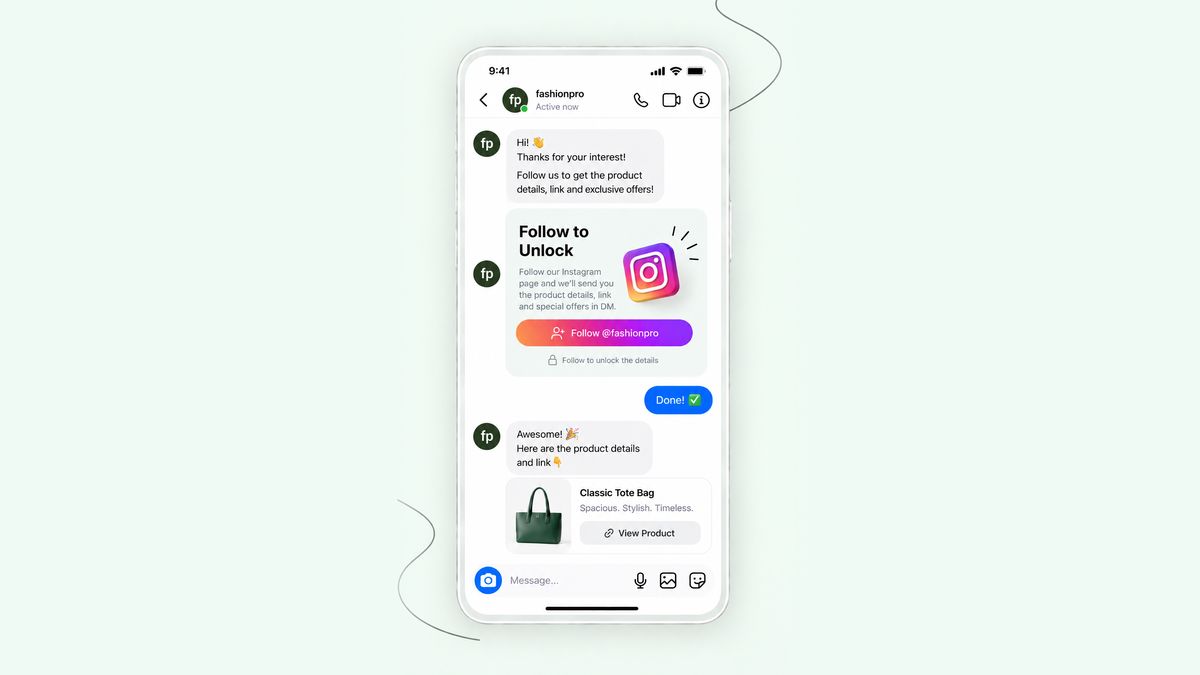
You check your notifications and see 40 new followers from yesterday's reel. It feels like you should say hello. A quick "welcome, here's where to start" would make them feel noticed and point them at your best content before they forget why they followed.
So you look for a way to send every new follower a welcome DM automatically. A few official tools can do it for some accounts, many tools that promise it shouldn't be connected to your account, and for most people the better answer is something else.
This article gives you the honest answer on automatic welcome DMs, the methods that actually work on Instagram's official API, and 18 welcome messages you can copy.
Key takeaways
For most accounts, a follow doesn't let an app message someone. Automated messages on Meta's official API normally have to reply to something the person did, such as a comment, a Story reply or a DM. Meta is testing follow-triggered messages with some partners, for example ManyChat's Follow to DM beta, but only for eligible creators that meet Meta's messaging requirements, and smaller accounts are unlikely to qualify. BlipDM doesn't offer it.
Tools that promise a welcome DM to every new follower outside an official beta use unofficial methods, usually logging in with your password. That breaks Instagram's terms and puts your account at risk of restrictions.
What works is welcoming people the moment they engage: when they comment, reply to a Story or send their first DM, an automation replies within seconds. Add a pinned start-here reel, a Story highlight, a clear bio and a Link in Bio, and every new follower has an obvious next step.
Why most accounts can't auto-DM every new follower
Meta's official Instagram API lets approved apps reply to people who contacted you. Someone comments on your post, replies to your Story, mentions you or messages you, and the app can respond within Meta's limits.
For most accounts, following you isn't on that list. Meta has started a limited test of follow-triggered messages: ManyChat, for example, offers a Follow to DM beta that sends a message when someone follows. Its own page says it's only for eligible Instagram creators that meet Meta's messaging requirements, that eligibility is Meta's decision, and that accounts with fewer than about 1,000 followers and little engagement are likely to be ineligible. General availability isn't guaranteed. BlipDM doesn't offer follow-triggered messages.
Outside that kind of official beta, a tool that promises "automatic welcome DMs to every new follower" has to work around the API. Usually that means one of these:
- It asks for your Instagram password and logs in as you, like a person tapping through the app.
- It runs a browser extension or phone automation that scrolls your follower list and sends messages.
- It scrapes your followers and sends messages from a server pretending to be the app.
All of these break Instagram's terms. They're also the most common reason accounts get action blocks, restrictions or worse. A welcome DM nobody asked for can also be reported as spam, which hurts more than the hello helps.
What works instead
Unless you're in an official beta, you can't message people the moment they follow. You can make sure that the moment they do anything, they get a warm, useful welcome, and that the people who never engage still find their way around your profile.
Welcome people who comment
New followers often comment on the reel that brought them in, or on your next one. A comment-to-DM automation replies to every comment with your keyword, or to any comment, with a DM within seconds.
You can't tell from a comment whether the person followed you today or two years ago, so write a message that works for both: a thank-you, the thing they asked for, and one place to go next.
A "start here" reel with the line "Comment START and I'll send you my best stuff" works well pinned to your grid. Every new follower who sees it has a reason to say hello.
Welcome people who reply to your Stories
Story replies come mostly from people who already follow you, which makes them the closest thing to a new-follower welcome. Post a Story like "New here? Reply HI and I'll send you where to start", and a Story reply automation sends the welcome to everyone who replies. See Instagram Story replies.
Welcome people who message you first
When someone sends their first DM, you have two options that work together:
- Instagram's own welcome message. In the app's messaging tools, you can set a greeting Instagram shows to people starting a new conversation with you. It's free and text only. See Instagram's built-in messaging tools.
- A DM keyword automation. If your Story, bio or pinned reel says "DM me START", an automation replies to that word with links, buttons or a carousel.
On BlipDM's Elite plan, AI replies can also answer the questions new followers tend to send, such as prices, how to book or where to start, and hand anything else to you.
Pin a start-here reel
Instagram lets you pin up to three posts or reels to the top of your grid. Use one of them as your welcome: who you are, what you share, and what to do next. Add a comment keyword to it so it doubles as an entry point to your DMs.
Make a "Start here" Story highlight
Highlights sit under your bio, where new followers look first. A short "Start here" highlight with three to five slides works as a welcome tour: your story, your best free resource, your offer, how to get in touch.
Write a bio that welcomes
Your bio is the first thing a new follower reads. Say what you do and give one next step, such as "New here? Comment START on my pinned reel." Our Instagram bio ideas have more.
Use a Link in Bio as your welcome desk
A Link in Bio gathers everything new followers might want: your free resource, your shop, your booking link, a discount code for first orders. BlipDM's Link in Bio (Pro and Elite) also has an email form block, so new followers can join your list straight from your profile.
Keep saved replies for manual welcomes
When you reply to DMs yourself, saved replies in the Instagram app let you insert a welcome with a shortcut, then personalise it. See Instagram quick replies.
18 Instagram welcome message examples
Use these for comment replies, Story reply automations, first-DM replies and your Instagram welcome message. Replace the brackets.
For creators
Start-here reply
Hey, thanks for being here! 👋 These are my three most-saved reels to start with. Anything you want me to cover next? Just reply.
Free resource
Welcome! As promised, here's my free [checklist]. If it helps, tell me. I read every reply.
Community invite
So glad you found me. I post [topic] tips every [day]. Want them in your inbox too? Tap below to join the newsletter.
Casual hello
Hi! Thanks for saying hello. What brought you here: [option A] or [option B]? I'll send you the right stuff.
For coaches and experts
Free starter
Welcome! Here's my free [guide/workbook] to get you started. When you're ready for more, the button below shows how I work with clients.
Discovery call
Thanks for reaching out! If you'd like to talk about [goal], you can book a free 15-minute call here. No pressure, just a chat.
Point to the best content
Hi and welcome 🙌 New here? Start with this one: it's the question I get asked most. Reply with yours and I'll answer it.
Set expectations
Thanks for your message! I reply to DMs personally within a day. Meanwhile, my free resources are all in one place here.
For shops and brands
First-order code
Welcome to [brand]! Here's 10% off your first order: [CODE]. It's valid for 7 days. Tap below to shop the bestsellers.
Bestsellers
Hi! Thanks for stopping by 💛 Here are our three most-loved pieces right now. Need a size or a colour? Just ask.
Help first
Welcome! Looking for something specific? Reply with what you need, or tap below to see the new collection.
Shipping and trust
Thanks for your message! We ship across [country] in [X] days, with easy returns. Here's the shop, and here's how sizing works.
For food, fitness and local businesses
Restaurant or café
Hey, welcome! 🍕 Here's this week's menu and our opening hours. Reply BOOK and we'll help you get a table.
Gym or studio
Welcome to [studio]! Your first class is on us. Tap below to pick a time that suits you.
Salon or service
Thanks for reaching out! You can see prices and book here. Any questions about [service], just reply.
For Story and comment replies
Story reply welcome
Hi! Thanks for replying 😊 Here's where to start if you're new. Tell me what you'd like to see more of.
Comment reply welcome
Thanks for the comment! Here's the [link] you asked for, plus a few more of my favourites below.
Instagram's built-in welcome message
Hi! Thanks for messaging [brand]. We usually reply within a few hours. For prices, type PRICE. For orders, type ORDER.
Tips for writing your own
- Lead with a thank-you, then the thing. People came for something; give it in the first line or two.
- One next step. A link to everything is a link to nothing. Pick the one action you most want.
- Ask a question. A reply from them keeps the conversation open for 24 hours, so you can help further.
- Keep it short. BlipDM text DMs are up to 400 characters, which is a good discipline anyway.
Setting up welcome replies in BlipDM
You can build all of the welcome replies above on BlipDM's Free plan, which includes 500 DMs a month.
- Connect Instagram. Sign in on Instagram's own screen with a professional account.
- Choose a trigger. A comment keyword on your pinned start-here reel, a Story reply, or a DM keyword such as START. Use "any comment" on the start-here reel if you want everyone to get a welcome.
- Write the welcome. Up to 400 characters and three link buttons. On Pro and Elite, add a carousel of your best resources or products, or send a PDF welcome pack directly in the DM.
- Add a public reply, if you like. Something like "Sent you a welcome 💌" under the comment.
- Activate. It runs around the clock.
On Elite ($6 or ₹499 a month), you can also ask for an email before sending a welcome pack, ask people to follow before a freebie unlocks (see follow to unlock), and let AI replies answer new followers' common questions. Start from the templates by goal, such as "grow" or "share content".
Frequently asked questions
Can you send an automatic welcome message to new followers on Instagram?
For most accounts, no: automated messages on Meta's official API normally have to reply to something the person did. Meta is testing follow-triggered messages with some partners, such as ManyChat's Follow to DM beta, for eligible creators only. Everyone else can automatically welcome people when they comment, reply to a Story or send a DM.
Are apps that DM every new follower safe?
It depends how they do it. An official partner running Meta's follow-message beta for eligible accounts is fine. Apps that ask for your password or automate the Instagram app to message every follower break Instagram's terms and are a common cause of action blocks and restrictions.
How do I set up a welcome message on Instagram?
In the Instagram app, open your messaging tools under your professional account settings and set a welcome message. Instagram shows it to people starting a new conversation with you. For comments and Story replies, use a DM automation tool on the official API.
What should I write in a welcome message for new followers?
Thank them, give them one useful thing (your best free resource, your top reels or a first-order code) and offer one next step. Ending with a question invites a reply and starts a real conversation.
How do I welcome new followers without DMing them?
Pin a start-here reel to your grid, make a "Start here" Story highlight, and put one clear next step in your bio and Link in Bio. Then post Stories that invite new people to reply, so they get a welcome DM when they do.
Can I message someone who just followed me?
You can message them yourself in the app, one by one. Automated messages can only start once they've commented, replied to a Story or messaged you, so a pinned reel or Story that invites them to say hello is the way to start a conversation at scale.
Sources
- Meta for Developers, Instagram Platform messaging and private replies documentation (messaging must follow user engagement).
- ManyChat, Follow to DM (beta, eligible Instagram creators only), checked 18 November 2026.
- Instagram Help Centre, messaging tools for professional accounts (welcome message, saved replies) and pinning posts to your profile.
- Instagram Terms of Use, on accessing Instagram through unauthorised means.
- BlipDM product documentation and pricing, checked 18 November 2026.