Someone sees your reel, comments "GUIDE", and a few seconds later the guide is in their DMs. That's an Instagram auto DM, and it has become the standard way for creators and small businesses to turn attention into clicks, leads and sales.
It works because the link arrives at the moment of interest, in a place people actually check, without sending them hunting through your bio. This article explains how auto DM works, what Instagram allows, how to set it up and how to write messages people actually tap.
Key takeaways
An auto DM is a message sent automatically after someone acts: commenting, replying to a Story or messaging you. You can't auto DM someone who has never interacted with you.
The most common setup is comment to DM. You ask people to comment a keyword, and a tool sends each of them a DM with a link button, usually with a public reply too.
You need a Business or Creator account and a tool on Meta's official API. BlipDM has a free plan with 500 DMs a month, and paid plans at $3 and $6 a month.
How Instagram auto DM works
Every auto DM has the same three parts:
- A trigger. Something the person does: a comment, a Story reply or a message.
- A condition. Usually a keyword, or you can reply to everything.
- A message. Text with link buttons, an image or a carousel.
When the trigger happens, Instagram tells your automation tool, and the tool sends your message through Meta's official API. It takes seconds and runs at any hour.
The three ways to auto DM on Instagram
Comment to DM
This is the one most people mean. Add "Comment LINK and I'll send it to you" to a post or reel. Everyone who comments the word gets your DM, and you can post a public reply under their comment as well.
It has a useful side effect: comments are a visible signal of engagement on the post, and a public reply shows others that the offer is real. See the comment to DM feature.
Story reply auto DM
Post a Story saying "Reply PLAN and I'll send it over". Each reply is a message to you, so your tool can answer with your link straight away. Stories disappear after 24 hours, which adds natural urgency to an offer. See the Story reply feature.
Inbox auto DM
Answer people who message you first, either with a keyword reply or a general response to any message. It's ideal for repeat questions such as prices and timings. There's more detail in Instagram auto reply.
What Instagram allows
| Situation | Can you auto DM? |
|---|---|
| Someone comments on your post or reel | Yes, one private reply per comment, within 7 days |
| Someone replies to your Story | Yes |
| Someone messages you | Yes, for 24 hours after their last message |
| Someone follows you | Not normally. Meta runs a limited beta for some eligible accounts, and BlipDM doesn't offer it |
| Someone likes your post | No |
| Someone views your profile or Story | No |
| Someone has never interacted with you | No |
Two more limits matter:
- 750 private replies an hour. This is Meta's cap per account on post and reel comments. A good tool queues the rest instead of failing.
- A private reply doesn't open a conversation. To send more messages after that first DM, the person needs to reply or tap a button.
For more on staying safe, read how to use Instagram auto DM without getting banned.
How to set up auto DM on Instagram
Here's the process in BlipDM. Other official tools work in a similar way.
Step 1: Switch to a professional account. In Instagram's settings, switch to a Business or Creator account. It's free.
Step 2: Connect Instagram. Sign up for free and connect through Instagram's own login screen. BlipDM never sees your password.
Step 3: Create a Comment to DM automation. Pick a post or reel. On Pro and Elite, you can choose your next post before you publish it.
Step 4: Choose a keyword. Pick one short word that's easy to spell and relevant, such as GUIDE, LINK or PRICE. Here's how to choose a comment keyword.
Step 5: Write the DM. Add your message and up to three link buttons. Buttons get tapped more easily than a pasted URL, and they keep the message tidy.
Step 6: Add a public reply. Something like "Sent! Check your DMs 💌". You can add up to five variations.
Step 7: Tell people about it. Put the keyword in your caption and say it in the first few seconds of your video.
Step 8: Test it. Comment from a second account and check the DM arrives.
Auto DM examples by business
| Business | Caption or Story line | What the DM sends |
|---|---|---|
| Coach | Comment GUIDE for my 5 DM scripts | The guide, plus a button to book a call |
| Creator | Comment LINK for everything on my desk | Affiliate links, with a disclosure line |
| Online store | Comment SHOP and I'll send this product | The product page, or a carousel on Pro |
| Café | Comment MENU for today's specials | The menu and an order link |
| Musician | Comment SAVE to pre-save the single | Spotify and Apple Music buttons |
| Real estate agent | Comment TOUR for the full walkthrough | The video, plus a booking button |
More ideas are on our pages for creators, coaches and experts, e-commerce brands, artists and labels and food and beverage brands.
How to write an auto DM people tap
Most auto DMs get read. Whether they get tapped comes down to a few habits:
- Open with what they asked for. "Here's the guide you asked for" beats "Hey! Thanks so much for engaging with my content!"
- One main action. Give a single clear button. Add a second only if it's a real next step.
- Name the button clearly. "Get the guide" or "See the menu" beats "Click here".
- Keep it short. Two or three lines usually does it. Instagram allows more, but phones don't show much at once.
- Sound like yourself. Write it the way you'd type it to a friend.
- Disclose affiliate links. If you earn from a link, say so. See how to share affiliate links in Instagram DMs.
Here's a message that follows those rules:
Here's the 5-script guide you asked for 👇 Script 3 is the one that gets the most replies.
[Get the guide]
Going further with auto DM
Once the basics work, these features can do more with the same traffic:
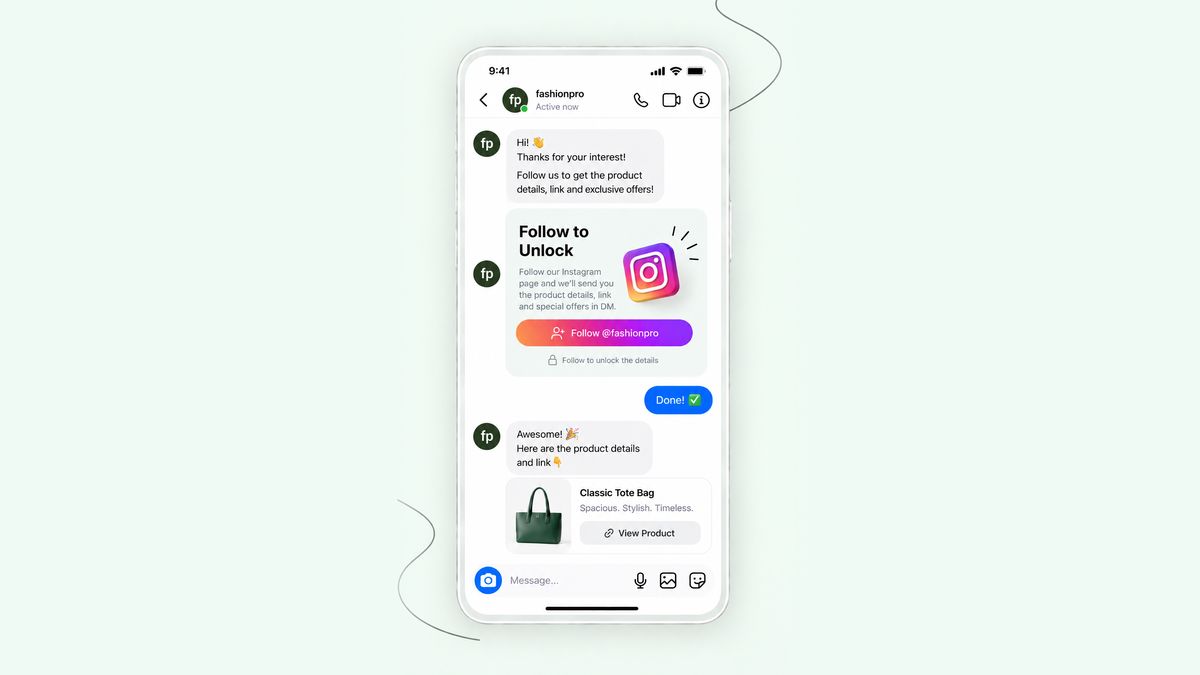
- Follow to unlock (Elite). Ask people to follow before they receive the link, and BlipDM checks that they did. See follow to unlock.
- Lead capture (Elite). Ask for an email or phone number in the DM, then export your list as a CSV. See lead capture.
- Carousels (Pro and Elite). Show up to five products in one swipeable message. See carousel DMs.
- Next Post (Pro and Elite). Set up an automation before you post, so it works from the first comment.
Common auto DM problems
The DM didn't arrive. Check that the automation is on and that the comment contains the keyword. Instagram sometimes puts messages from accounts someone doesn't follow in the Requests folder, so ask people to look there.
Nobody is commenting. Say the keyword out loud early in the video and repeat it in the caption. Make the offer specific.
People get two DMs. Another tool may still be connected, or two automations may match. Use one tool per account.
Comments look spammy. Vary your public replies, and keep them short.
What auto DM costs
| Tool | Free plan | First paid plan |
|---|---|---|
| BlipDM | 500 DMs a month | $3 a month (₹99) for 50,000 DMs |
| Zorcha | Unlimited DMs | $14.99 a month |
| CreatorFlow | 500 DMs a month | $15 a month for 5,000 DMs |
| LinkDM | 1,000 DMs a month | $19 a month for 25,000 DMs |
| ManyChat | 25 active contacts | $14 a month billed annually, for 250 contacts |
See free Instagram auto DM tools for a closer look at the free plans, or ManyChat pricing explained if you're comparing bills. Prices were checked on 3 November 2026.
Frequently asked questions
What is an auto DM on Instagram?
An auto DM is a message sent automatically from your Instagram account after someone acts, usually by commenting a keyword, replying to your Story or messaging you. It's sent through a tool on Meta's official API.
How do I auto DM people who comment on my Instagram post?
Connect a tool such as BlipDM, create a comment-to-DM automation, pick the post, choose a keyword and write your DM. Add the keyword to your caption so people know what to comment.
Is auto DM allowed on Instagram?
Yes, through Meta's official API and within its rules. The person has to act first, and you can send one private reply per comment within 7 days. Cold mass DMs aren't allowed.
Can I auto DM new followers on Instagram?
Generally not. A follow doesn't normally let you message someone. Meta runs a limited beta with some eligible accounts on certain platforms, but BlipDM doesn't offer it. You can use a comment or Story reply as the starting point instead.
Can I auto DM all my followers at once?
No. There's no official way for ordinary accounts to message all followers. Tools that promise this work outside Meta's rules and put your account at risk.
How many auto DMs can I send a day?
Meta's published limit for private replies to post and reel comments is 750 an hour per account. Your plan may also have a monthly limit: BlipDM Free sends 500 DMs a month, Pro 50,000 and Elite is unlimited.
Can an auto DM include a link?
Yes. You can include link buttons, and BlipDM allows up to three per message. Read how to send links in Instagram DMs.
Do I need a business account to auto DM?
You need a professional account, which can be Business or Creator. Switching from a personal account is free.