An Instagram DM bot can mean two very different things. One is a legitimate tool that answers people who message you, on Meta's official API. The other is a spam tool that logs in with your password and blasts strangers until your account gets restricted.
Search for "Instagram DM bot" and you'll find both side by side. This article explains the difference, compares keyword bots with AI chatbots, and shows how to set up a safe one. It also says plainly how BlipDM works: replies are keyword-based, and you write them. They are not generated by AI.
Key takeaways
A safe Instagram DM bot only replies after someone acts first, by commenting, replying to a Story or sending a message. It connects through Instagram's official login and never asks for your password.
Keyword bots send the exact message you wrote when they see a word you chose. AI chatbots write replies themselves. Keyword bots are predictable and cheap. AI bots handle open questions but can get things wrong.
Mass DM bots that message strangers break Meta's rules and put your account at risk, so avoid them, however cheap they are.
What is an Instagram DM bot?
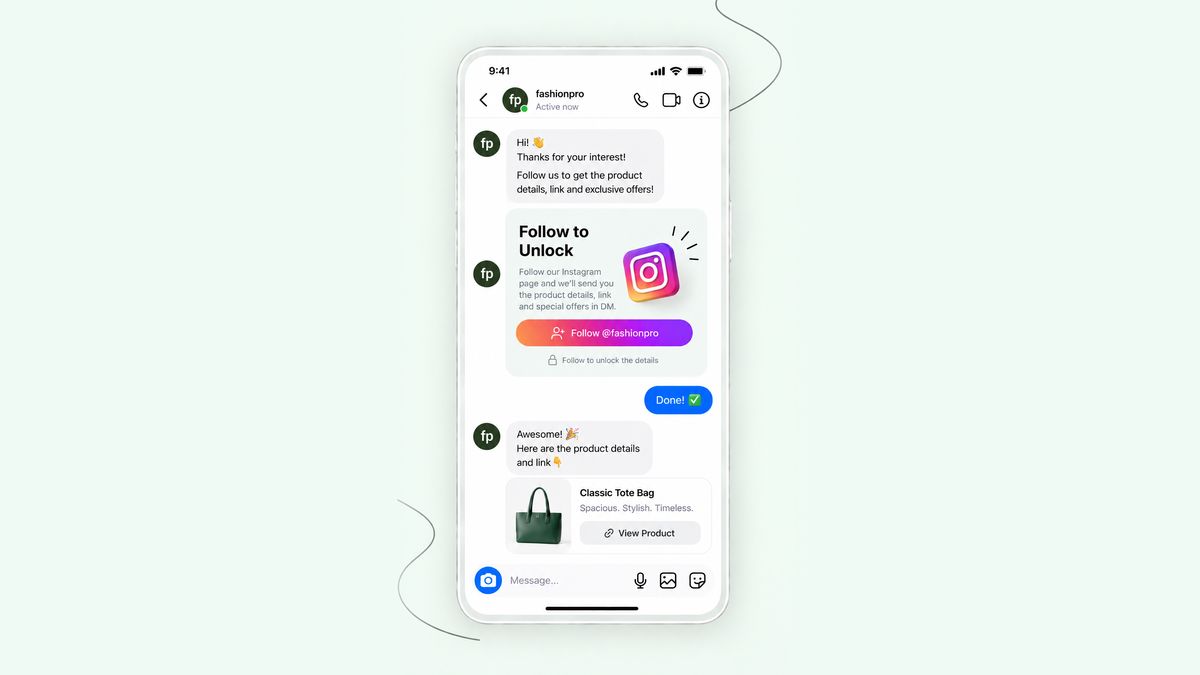
An Instagram DM bot, or Instagram chatbot, is software that sends messages from your account automatically. A typical one might:
- Send a link to everyone who comments "LINK" on a reel
- Answer "price" in your inbox with your price list
- Reply to Story replies with an offer
- Ask for an email address and save it
No one needs to be online, so people get an answer in seconds at any hour.
Keyword bots vs AI chatbots
| Keyword bot | AI chatbot | |
|---|---|---|
| How it replies | Sends the message you wrote | Writes a reply itself |
| What triggers it | A word you chose, or any message | Any message |
| Setup | Minutes | Needs training material and testing |
| Risk of wrong answers | None beyond what you wrote | Can invent or misstate details |
| Open questions | Falls back to a general reply | Handles them better |
| Cost | Often very low | Usually higher, often credit-based |
| Best for | Links, lead magnets, FAQs, prices | Many varied questions, support |
Neither is simply better. If most of your messages are "link?", "price?" and "timings?", a keyword bot answers them perfectly every time. If your customers ask long, varied questions, an AI chatbot may suit you better, as long as you check its answers.
How BlipDM's DM bot works: keywords, plus AI replies on Elite
BlipDM's automations are keyword-based on every plan. Here's what that means in practice:
- You write every message. BlipDM sends your words, your links and your images. It doesn't compose replies.
- You choose the trigger. It can be a specific keyword or any comment, Story reply or message.
- Matching is simple. It ignores capitals and finds your keyword inside a longer message, so "what's the PRICE?" triggers PRICE.
- It won't hold a conversation. It can't understand a question it has no keyword for. An any-message reply can cover those and tell people when you'll answer personally.
On the Elite plan you can also turn on AI replies. You give BlipDM your FAQs and an overview of what you sell, and it answers incoming DMs on its own, such as price, sizes, delivery or how to book, and leaves anything it can't answer for you in the inbox. It only replies to people who messaged you, inside Meta's rules. For how AI agents compare, see AI DM agents for Instagram and the best AI Instagram DM tools.
What Meta allows
Meta permits automated messaging, within rules that apply to every tool on the official API.
Allowed:
- Replying to someone who messaged you, within 24 hours
- One private reply to a comment, within 7 days of the comment
- Asking for an email or phone number in a chat the person started
- Link buttons, images and carousels within the conversation
Not allowed:
- Messaging people who never interacted with you
- Sending promotions after the 24-hour window closes
- Using a human-agent tag to send automated messages outside the window
The official limit for private replies is 750 an hour per account for post and reel comments. For the full picture, read how to use Instagram auto DM without getting banned.
Instagram DM bots to avoid
Be careful with anything that promises the following:
- "Mass DM thousands of users." Cold mass messaging isn't possible on the official API, so these tools work around it.
- "Enter your Instagram username and password." Official tools use Instagram's own login screen.
- "Auto follow, auto like, auto comment." These are fake engagement tools and a separate risk.
- "DM all your followers." Meta's API doesn't allow this for ordinary accounts.
- A browser extension that runs on your account. It behaves like a person clicking very fast, which is what Instagram looks for.
The result can be blocked actions, restrictions or a disabled account, and a lost account costs far more than any tool.
How to set up a safe Instagram DM bot
1. Check your account. You need a Business or Creator account. Switching is free.
2. Choose an official tool. Look for a Meta Tech Provider or Business Partner badge, and connect through Instagram's own screen. BlipDM is free to start.
3. List your top questions. Look through your last 50 DMs and comments. Most accounts find that five questions account for most of their messages.
4. Create one automation per question. For example:
| Keyword | Reply |
|---|---|
| PRICE | Your price list, with a button to your page |
| LINK | The product or resource you mention most |
| TIMINGS | Your opening hours |
| BOOK | A button to your booking page |
| Any other message | "Thanks for writing. We'll reply personally within a day. For prices, send PRICE." |
5. Add a comment trigger. Pick your best post or reel, set a keyword, and mention it in the caption.
6. Test from a second account. Try the keyword in capitals, in lowercase and inside a sentence.
7. Read your messages each week. New repeat questions show you which keyword to add next.
What to do with messages the bot can't answer
A keyword bot only knows what you've taught it, so plan for the rest:
- Add an any-message reply that sets expectations ("We reply within a day") rather than pretending to understand.
- Answer the rest yourself. Conversations stay in your normal Instagram inbox.
- Turn repeated questions into new keywords.
- Tell people that the first reply is automated if there's any chance they'd assume otherwise.
What a DM bot costs
| Tool | Type | Starting paid price |
|---|---|---|
| BlipDM | Keyword | $3 a month (₹99), free plan with 500 DMs |
| CreatorFlow | Keyword | $15 a month |
| LinkDM | Keyword | $19 a month |
| ManyChat | Flows, AI on Pro ($29 annually) | $14 a month billed annually |
| Zorcha | Keyword, with AI FAQs | $14.99 a month, unlimited free DMs |
| Chatfuel | AI agent | $20 a month ($18 billed yearly) |
For a full comparison, see the best Instagram DM automation tools.
Frequently asked questions
What is an Instagram DM bot?
It's software that sends Instagram messages from your account automatically, usually after someone comments, replies to a Story or sends a DM. Safe bots run on Meta's official API and only reply after the person acts first.
Is it legal to use a bot on Instagram?
Automated messaging through Meta's official API is permitted within Meta's rules. Tools that use your password, send mass DMs to strangers or fake engagement break Instagram's terms and can get your account restricted.
Is BlipDM an AI chatbot?
Partly. Its automations are keyword-based on every plan: you write each message, choose the word that triggers it, and BlipDM sends it exactly as written. On the Elite plan, AI replies can also answer DMs from your FAQs and product overview, and leave anything they can't answer for you.
What is the difference between a chatbot and an auto responder?
An auto responder sends a set reply when something happens. A chatbot can also mean software that holds a conversation, often using AI. People use the two terms loosely, so check whether a tool writes replies itself or sends ones you wrote.
Can an Instagram bot DM all my followers?
Not on Meta's official API for ordinary accounts. You can only message people who have interacted with you, within Meta's time limits. Anything promising otherwise works outside the rules.
Are there free Instagram chatbots?
Yes. BlipDM has a free plan with 500 DMs a month, and Zorcha lists unlimited free DMs with 20 AI FAQs. See free Instagram auto DM tools for more.
Will a DM bot get my account banned?
A bot on the official API, used within Meta's limits, shouldn't. Bans and restrictions usually come from unofficial tools, cold mass messaging or spam complaints.
Can a DM bot collect email addresses?
Yes. On BlipDM's Elite plan it asks for an email or phone number in the DM, checks that it's valid and saves it to your contacts. See Instagram lead capture.